Join Nakul's Network
How It Actually Works
Think of our home server as a house at the end of a private road. The internet is the public highway, anyone can drive it, but they can't turn onto our road. Tailscale is the gate key that lets your device onto that private road.
                THE INTERNET  ·  the public highway
   ┌───────────────────────────────────────────────────────────────┐
   │  anyone can drive this highway, but there is no turn-off      │
   │  that reaches us, so strangers never even find the road       │
   └───────────────────────────────────────────────────────────────┘

   ┌──────────────┐                                 ┌──────────────┐
   │  YOUR DEVICE │                                 │  HOME SERVER │
   │  (anywhere)  │ ◄═══ encrypted private road ══► │  (at home)   │
   │  holds the   │   only your device can use it   │  movies,     │
   │  gate key    │                                 │  photos &    │
   └──────────────┘                                 └──────────────┘
        ▲                                                  ▲
        │  the auth key                                    │  nothing here is
        │  opens the gate                                  │  exposed publicly
- Tailscale = your gate key (the private road).
- Streamyfin = the TV remote (plays what's in the house).
- The auth key the admin gives you = your personal copy of the gate key. Don't share it.
📲 Joining the Network: Screen by Screen
First: Install Tailscale
Get the free Tailscale app from the App Store (iPhone) or Google Play (Android), or on a Google/Apple TV. Open it once, then follow the screens below.
Tailscale is the secure tunnel between your device and our server, it only carries traffic to our house, and does not watch or reroute your normal browsing.
Step 1: Go to Tailscale Settings
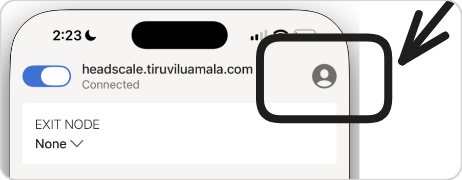
Open the menu / account icon in the top corner of the Tailscale app.
Step 2: Access Network Settings
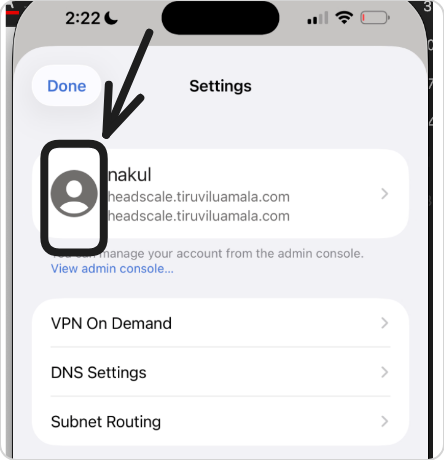
Step 3: View more settings
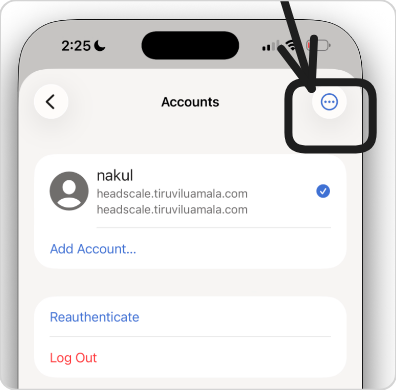
Step 4: Use an auth key
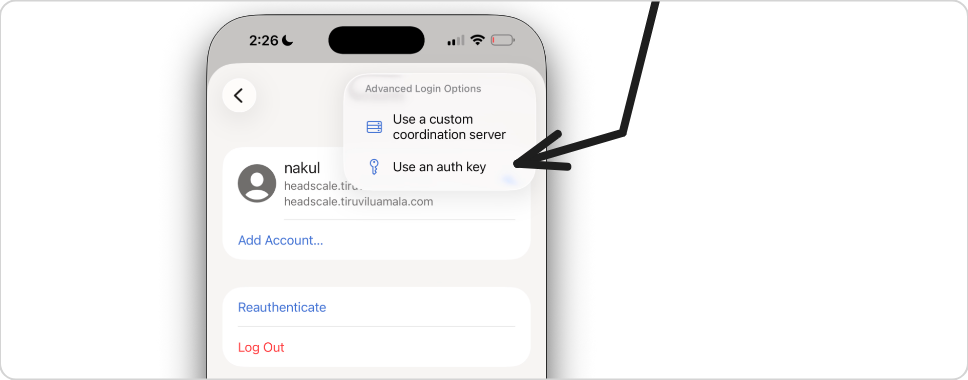
Choose Use an auth key, paste the key the admin texts you, then Log in, you're on instantly: nothing to request, no approval to wait for.
Step 5: Enter the network credentials
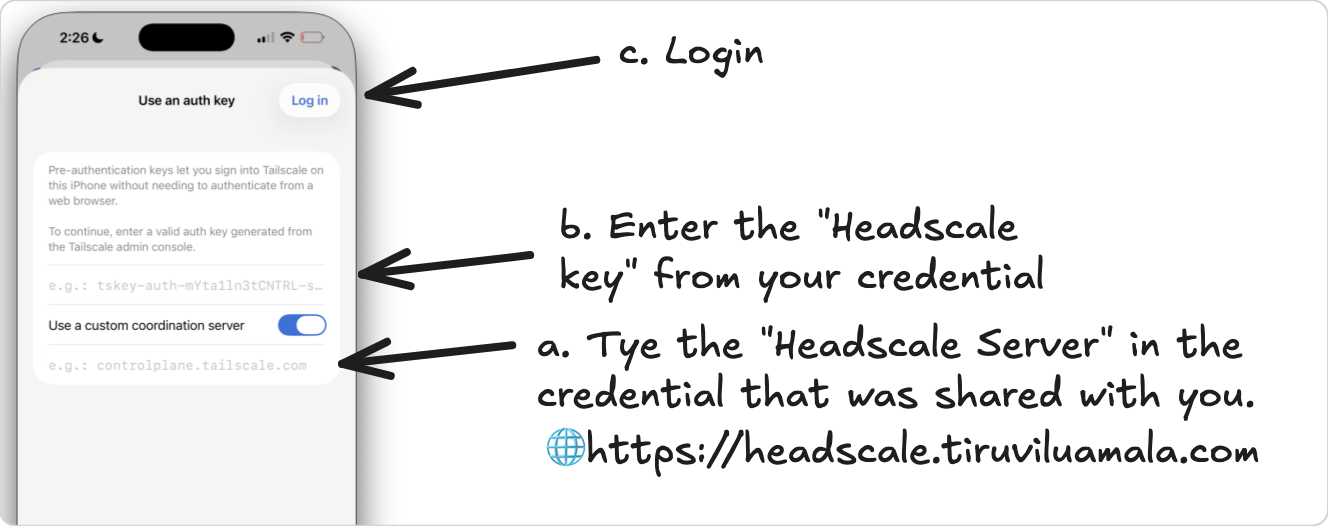
We run our own coordination server (Headscale), so you point Tailscale at ours: enter https://headscale.tiruviluamala.com as the server, paste your key, then Login.
Step 6: Return to the main screen
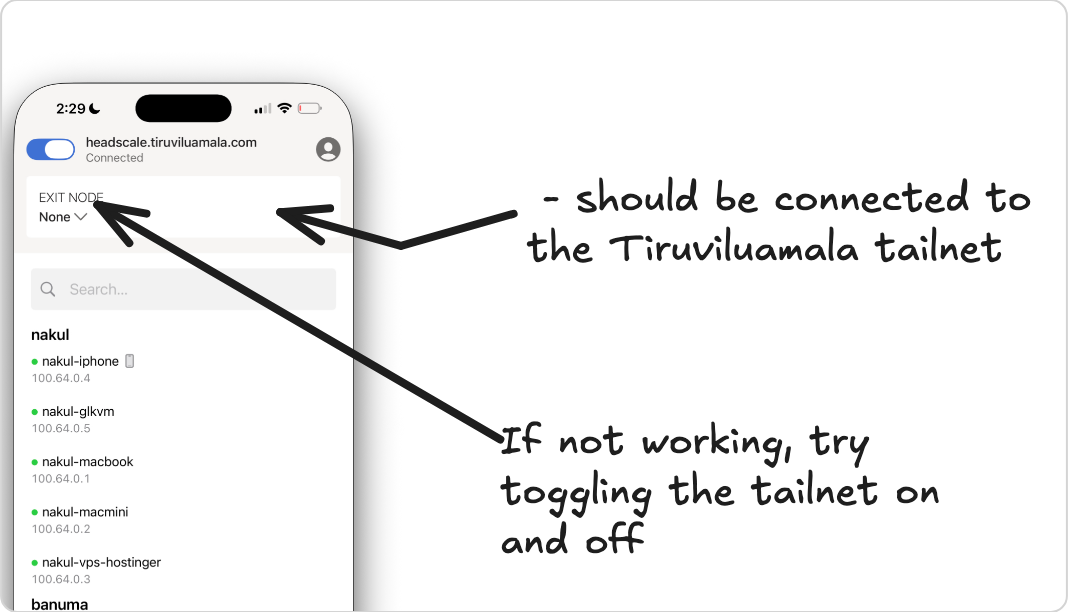
The main switch should be green / connected, you're on the network ✅. If asked, turn on MagicDNS and Allow LAN access.
Now: Install the Watching App
You're on the network. Now get the app that plays our movies & shows.
- Server address: the one the admin gives you (it starts with
https://). - Log in with the username + password you were given.
✨ Why Streamyfin is the easy button
Streamyfin is built for exactly this. You sign in with your account and it just works, no settings to fiddle with, smooth playback, downloads for offline. For 95% of people the whole job is: install Streamyfin → enter the server → log in → done.
Trouble connecting?
| Problem | Fix |
|---|---|
| App won't load / spins forever | Tailscale is probably off. Open it, make the switch green, retry. |
| "Can't connect to server" | Check the address starts with https:// (the s). Make sure Tailscale is on first. |
| Worked before, now it doesn't | Toggle Tailscale off/on. Turn off Low Power Mode / any other VPN. |
| Movie is choppy | Make sure you're using the app, not a browser. If it persists, ask the admin, it may be a server-side encoding setting. |
| Want a movie that isn't there | Use the Request page on the family home page (the admin will share the address). |
Glossary
| Term | What it is | Analogy |
|---|---|---|
| Tailscale | The app that puts your device on our private network | The gate key to a private road |
| Headscale | Our own server that runs the network | Owning the gate instead of renting it |
| Auth key | Your personal sign-in code for the network | Your copy of the gate key |
| Streamyfin | The phone apps that play our movies & shows | The TV remote |
| MagicDNS | Lets you use nice names instead of number addresses | Saved contacts instead of phone numbers |